Elsewhere Messenger
Elsewhere / Windows
Blue glass, a buddy list, and a little window for your people. Explore the Windows beta, Elsewhere Accounts, and connected services.
welcome to cyberstudios ♡
CyberStudios is where I bring my ideas into existence, from adaptive games and digital companions to expressive interfaces, experimental art, and whatever else I decide to create.
There's always another window to open, another world to build, and probably another project I started at 3 AM. Make yourself at home. ✧

I wanted a buddy list that felt like mine again. So I built a little glass window for it. Bring your friends, dig through the skins, or see what else lives inside Elsewhere.

Explore my repositories, source code, and little projects in progress.
↗ Visit my GitHub · @cyberthreed ↗ CyberStudiosTM organization ↗ CyberStudios ModKit · source-available modsSome ideas become gameplay systems. Some become pastel workspaces, little browser experiments, or a pixel cat who decides your desktop is his desktop. CyberStudios brings them together through a love of creative code, expressive design, and digital places with a personality of their own.
I believe software can be colorful. Strange. Nostalgic. Unexpected. A little surreal. The projects below are different ways of exploring that belief, from things you can use today to ideas still taking shape. Step inside the studio →
A little bit of everything. Browse CyberStudios projects and find what you're looking for.
Elsewhere / Windows
Blue glass, a buddy list, and a little window for your people. Explore the Windows beta, Elsewhere Accounts, and connected services.
Elsewhere / Windows
A sky-blue desktop shell project for Windows 11, with windows, sounds, and a workspace you can make your own.
Bytes / Desktop Companions
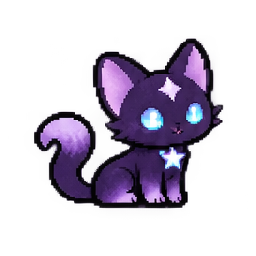
CyberStudios' original pixel cat and professional screen dweller. Pet, feed, play, talk, and let Byte keep you company in his room or on your Windows desktop.
v1.0.0 · WINDOWS x64VS Code / Blender
Eight little workspaces for your code, plus twenty themes for Blender. Pastel daydreams, midnight terminals, forest greens, and a palette for whatever you’re making next.
VS CODE v1.0.0 · 20 BLENDER THEMESCreative Coding / Interactive Art
Digital apparitions built from letters, symbols and code. Wander through animated ASCII artwork and character studies that make plain text feel haunted and alive.
ACTIVE COLLECTION · ANGELS #00 AVAILABLEBlender / Themes
Twenty Blender themes, from Cotton Candy Soft and Vivid to Strawberry Milk, Mint Meringue, Sakura Dusk, Obsidian Forge, Deep Current, Carbon Volt, Ridgeline, and Concrete Day.
20 THEMES · BLENDER 5.2 · XML AVAILABLEBlender / Plug-ins
A Blender add-on that switches between the CyberStudios themes and any theme you have installed. Paste a theme’s code, save it under a name, and export it to your computer.
v1.0.0 · BLENDER 4.2+ · TESTED ON 5.2Developer Utilities
A tiny local-first CLI for inspecting TCP ports, listening processes, and HTTP responses.
v0.1.1 · PYTHON CLI · PYPIDeveloper Utilities
A read-only CLI that inspects, validates, and audits Sims 4 and inZOI mod packages.
v0.1.1 · PYTHON CLI · PYPIDesktop Companions
A cozy Windows desktop companion with illustrated glass to collect, a lounge to decorate, ambient sounds, reminders and Byte stopping by. Everything stays on your device.
Content note: cannabis-themed.
PREVIEW 0.3.0 · GITHUB RELEASE COMINGinZOI / Gameplay Mod
Your Zoi said “just one drink.” Five intoxication stages, custom emotions, drunk interactions, and hangovers give inZOI's mixed drinks a whole story. The morning after might deserve its own chapter.
RELEASED · inZOIinZOI / Source-Available Mods
Source code for my inZOI mods, with download pages for TipsyZois, PowerNaps, PajamaParty, and AllowProposalOnVacation.
SOURCE-AVAILABLE · inZOIinZOI / Gameplay Framework
An in-development gameplay framework exploring shared context, memory, and compatible modules for more connected simulation experiences.
IN DEVELOPMENTCyberCore / Gameplay Module
A developing CyberCore module about the history between people: family connections, social memories, and the interactions that give relationships a past.
IN DEVELOPMENTCreative Experiments
A planned palette workshop for creating and exporting custom VS Code colors. Another way to make your developer workspace feel like your own.
PLANNEDCreative Experiments
A planned browser desktop full of tiny applications and nostalgic internet energy. A little digital place to open, explore, and make yourself at home.
PLANNEDNo matching projects found. Try a different search. ♡
Pull requests I've sent to other open-source projects.
Asset popup · UI fix
Show the original file size in the asset popup.
MERGEDSearch · bug fix
Remove failed searches from the search history.
OPENHome Assistant MCP · feature
Support image entities in the camera image tool.
OPENByte is our original pixel-cat mascot and the first companion in the Bytes family. Black-and-purple fur, bright cyan eyes, a star on his forehead, and a full-time job keeping Cy company. Byte.exe gives him a cozy room and a place on your Windows desktop.
His interests include naps, tiny games, and making your computer feel a little less lonely. Pet him, feed him, toss a star, or let him wander while you create. Adopt Byte.exe →
No chores. No punishments. Just a little digital friend. Byte saves his care state locally, and his needs do not decay while you are away. He will still be glad to see you when you return.
Explore CyberStudios code, project folders, and documentation on GitHub.
Read Byte.exe's installation, development, and application notes in the Byte source directory.
No. CyberStudios is the parent studio. Byte.exe is one of its creations and the first desktop companion in the Bytes product line.
No. Cybercore refers to a dreamy digital aesthetic used in projects such as the Cotton Candy VS Code themes. CyberCore Gameplay is a separate inZOI gameplay framework in development.
No. Byte.exe is a local-first desktop companion. Its care state is stored on your computer.
No. Byte uses locally defined interactions and responses. His Talk feature does not require an online AI provider.
Visit the official Byte.exe page for the Windows download and instructions.